Kuliah Tanpa Dosen

Solusi Cerdas Kuliah Masa Kini!

  • Home
  • Materi Kuliah
    • Semester 1
      • Konsep Teknologi Informasi
      • Logika Informatika
      • Algoritma Dan Struktur Data
      • Kalkulus
      • Aplikasi Perkantoran
      • Perangkat Keras Komputer
      • Bahasa Inggris
      • Bahasa Indonesia
      • Pendidikan Agama
    • Semester 2
      • Belum Ditambahkan
      • Belum Ditambahkan
      • Belum Ditambahkan
    • Semester 3
      • Bahasa Inggris 3
      • Matematika Numerik
      • Object Oriented Design
      • Desain Grafis Dan Multimedia
      • Sistem Operasi 2
      • Jaringan Komputer 1
      • Pemograman Client Server
      • Pemograman Komputer 1
      • Sistem Basis Data 1
    • Semester 4
      • Belum Ditambahkan
    • Semester 5
      • Enterprise Resource Planning
      • E-Business Dan E-Commerce
      • Artificial Intelligence
      • Data Warehouse
      • Object Oriented Programming 2
      • Web Programming 2
      • Keamanan Data Dan Jaringan
      • Mobile Programming
    • Semester 6
      • Belum Ditambahkan
      • Belum Ditambahkan
      • Belum Ditambahkan
    • Semester 7
      • Rekayasa Perangkat Lunak
      • Sistem Informasi Akutansi
      • Manajement Proyek IT
      • Pengembangan Karakter Dan Kepemimpinan
    • Semester 8
      • Belum Ditambahkan
      • Belum Ditambahkan
      • Belum Ditambahkan
  • Tugas Kuliah
    • Semester 1
      • Konsep Teknologi Informasi
      • Logika Informatika
      • Kalkulus
      • Algoritma Dan Struktur Data
      • Aplikasi Perkantoran
      • Perangkat Keras Komputer
      • Bahasa Inggris
      • Bahasa Indonesia
      • Pendidikan Agama
    • Semester 2
      • Belum Ditambahkan
      • Belum Ditambahkan
      • Belum Ditambahkan
    • Semester 3
      • Belum Ditambahkan
      • Belum Ditambahkan
      • Belum Ditambahkan
    • Semester 4
      • Belum Ditambahkan
      • Belum Ditambahkan
      • Belum Ditambahkan
    • Semester 5
      • Belum Ditambahkan
      • Belum Ditambahkan
      • Belum Ditambahkan
    • Semester 6
      • Belum Ditambahkan
      • Belum Ditambahkan
      • Belum Ditambahkan
    • Semester 7
      • Belum Ditambahkan
      • Belum Ditambahkan
      • Belum Ditambahkan
    • Semester 8
      • Belum Ditambahkan
      • Belum Ditambahkan
      • Belum Ditambahkan
  • Software
    • CodeBlocks
    • Dia
    • VirtualBox
    • VMware
  • Profil

Selamat Datang Di "Kuliah Tanpa Dosen"

KULIAH TANPA DOSEN

Solusi Cerdas Kuliah Masa Kini.

Temukan Berbagai Macam Ilmu Kuliah Disini!

Kunjungi,Cari Ilmu,Dan Ajarkan Pada Semua.

Tugas UTS Konsep Teknologi Informasi

Politeknik Harapan Bersama Tegal

D4 - TEKNIK INFORMATIKA.

Jumlah Pengunjung

KATEGORI

  • Bahasa Indonesia
  • Materi Algoritma Dan Struktur Data
  • Materi Aplikasi Perkantoran
  • Materi Bahasa Inggris
  • Materi Kalkulus
  • Materi Konsep Teknologi Informasi
  • Materi Logika Informatika
  • Materi Pendidikan Agama
  • Materi Perangkat Keras Komputer
  • Software
  • Tugas Algoritma Dan Struktur Data
  • Tugas Aplikasi Perkantoran
  • Tugas Bahasa Indonesia
  • Tugas Bahasa Inggris
  • Tugas Kalkulus
  • Tugas Konsep Teknologi Informasi
  • Tugas Logika Informatika
  • Tugas Pendidikan Agama
  • Tugas Perangkat Keras Komputer
  • Beranda

Blog Archive

  • ▼  2016 (55)
    • ▼  November (37)
      • Cara Setting Format Naskah Document Microsoft Word
      • Tugas Ke Empat Logika Informatika
      • Tugas Perangkat keras komputer
      • Tugas Membuat Presentasi Tentang Integral
      • TUGAS 6 ALGORITMA DAN STRUKTUR DATA
      • TUGAS 5 ALGORITMA DAN STRUKTUR DATA
      • TUGAS 4 ALGORITMA DAN STRUKTUR DATA
      • Tugas Kelima Logika Informatika
      • Tugas Satu Logika Informatika
      • Tugas Dua Logika Informatika
      • Tugas Pertama Pendidikan Agama
      • Tugas Keempat Konsep Teknologi Informasi
      • Tugas Ketiga Konsep Teknologi Informasi
      • Tugas Kedua Konsep Teknologi Informasi
      • Tugas Pertama Konsep Teknologi Informatika
      • Tugas Membuat Surat Lamaran Kerja
      • Tugas Membuat Surat Pribadi
      • Tugas Mencari Artikel Bahasa Inggris Tentang Biogr...
      • Tugas Membuat Artikel Bahasa Inggris Tentang Benca...
      • Tugas Membuat Artikel Bahasa Inggris Tentang Tekno...
      • Penjelasan Tentang Adverb
      • Penjelasan Tentang Adjective
      • Penjelasan Tentang Verb
      • Penjelasan Tentang Noun
      • Pengertian dan Jenis-Jenis Tanda Baca
      • Penjelasan tentang EYD
      • Pengertian dan Jenis-Jenis Bentuk Kata
      • Apa Itu Cloud Computing?
      • TUGAS 3 ALGORITMA DAN STRUKTUR DATA
      • TUGAS 2 ALGORITMA DAN STRUKTUR DATA
      • Tugas Membuat Kuis Di Power Point Menggunakan Funs...
      • KONSEP DASAR INTERNET
      • Penggunaan SWITCH-CASE di C++
      • Download Aplikasi VMware
      • Cara Merakit Komputer Sendiri Lengkap Dengan Gambar
      • Pengertian Dan Contoh Kalimat Nominal Dan Verbal D...
      • Cara Membuat Hyperlink Pada Microsoft Power Point ...
    • ►  Oktober (18)

JAM


KALENDER

Calendar Holiday by Ady Calendar

Rabu, 09 November 2016

Cara Setting Format Naskah Document Microsoft Word

08.46  Materi Aplikasi Perkantoran  No comments

  1. Langkah pertama adalah bukan microwoft word pada laptop atau komputermu lalu mulai degan mengatur ukuran kertas dan margin sesuai dengan yang di arahkan pada halaman document naskah dengan klik “Page Layout” seperti gambar di bawah ini
n1 
Gambar 1.1 tampilan page layout
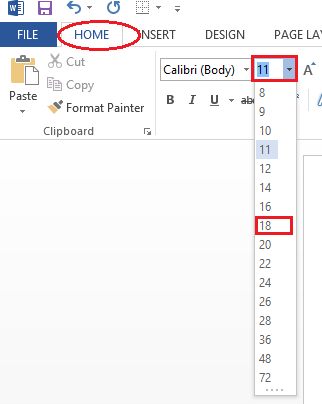
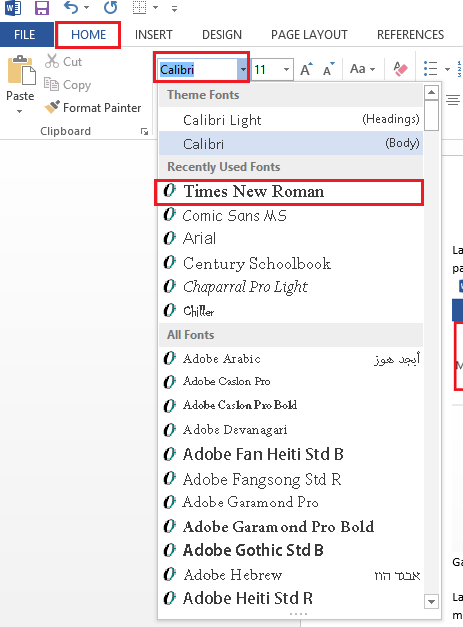
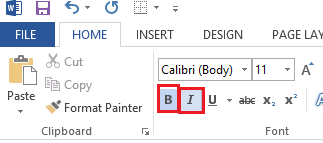
  1. Langkah kedua adalah mengatur format tulisan
– ukuran 18,
– font “times new roman”,
– tebal dan miring
dengan klik menubar “home” seperti gambar di bawah ini:
n4 
Gambar 1.2 mengubah ukuran fontn3
Gambar 1.3 mengatur jenis font
n5 
Gambar 1.4 mengatur font
  1. Langkah ketiga adalah agar terlihat lebih rapi perlu adanya mengatur rata tulisan dan mengatur spasi 1.5 pada tulisan naskah seperti gambar di bawah ini:
n6 
Gambar 1.5 tampilan spasi
  1. Langkah keempat adalah jika memerlukan adanya animasi atau gambar klik “insert” lalu klik “pictures” seperti gambar di bawah ini:
n7 
Gambar 1.6 tampilan menu insert
  1. Langkah kelima adalah pilih photo yang diinginkan lalu klik insert seperti gambar di bawah ini:
n8 
Gambar 1.7 tampilan pictures
  1. Langkah keenam jika telah selesai mengetik naskah maka save dengan cara klik “file” pada pojok kanan atas lalu klik “save as” lalu klik “computer” seperti gambar di bawah ini:
n10 
Gambar 1.8 tampilan file
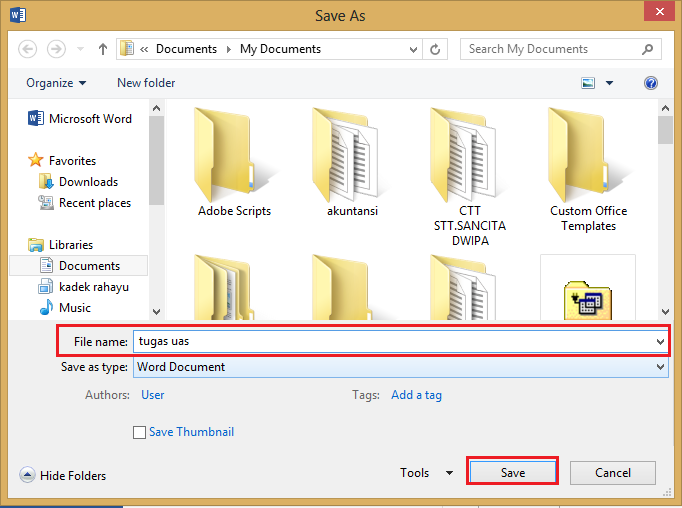
  1. Langkah ketujuh adalah dengan mengganti judul naskah lalu klik “save” seperti gambar di bawah ini:
n11 
Gambar 1.9 tampilan computer.
Sumber

Baca Selengkapnya

Tugas Ke Empat Logika Informatika

08.33  Tugas Logika Informatika  1 comment

Download Jawaban Dari Soal Di Atas,Klik Download Dibawah Ini :
http://adf.ly/1fUzTz


Baca Selengkapnya

Tugas Perangkat keras komputer

06.28  Tugas Perangkat Keras Komputer  No comments

TIDAK ADA TUGAS.

Baca Selengkapnya

Sabtu, 05 November 2016

Tugas Membuat Presentasi Tentang Integral

05.52  Tugas Kalkulus  2 comments


Tugas Membuat Presentasi Tentang Dasar-dasar Integral.

Download File Tugasnya Dengan Klik Download Dibawah ini :

http://adf.ly/1fEB7F
 

Baca Selengkapnya

TUGAS 6 ALGORITMA DAN STRUKTUR DATA

05.44  Tugas Algoritma Dan Struktur Data  No comments


 PETUNJUK SOAL !

Buatlah Progam Kasir dengan mengunakan 3 metode percabangan


Untuk Jawaban Dari Soal Di atas dapat Di download dengan Klik Download di bawah Ini :

http://adf.ly/1fOJMn

Baca Selengkapnya

TUGAS 5 ALGORITMA DAN STRUKTUR DATA

05.34  Tugas Algoritma Dan Struktur Data  No comments


 PETUNJUK SOAL !
*. Buatlah Program untuk menentukan 8 buah bilangan TERKECIL
*. Menentukan apakah yg dimasukan Bilangan Negatif atau Positif.

 Untuk Jawaban Dari Soal Di atas dapat Di download dengan Klik Download di bawah Ini :


http://adf.ly/1fOIgt

Baca Selengkapnya

TUGAS 4 ALGORITMA DAN STRUKTUR DATA

05.25  Tugas Algoritma Dan Struktur Data  No comments


PETUNJUK SOAL !
Menentukan Film Layak Tonton Sesuai Usia jika 0-18 -> Tidak Layak Tonton jika 18-meninggal -> Layak Tonton
- Selesaikan menghitung Usia jika usia 0-4 -> balita
    jika usia 5-6 -> Taman Kanak-kanak
    jika usia 7-13 -> SD
    jika usia 14-17 -> Anda SMP
    jika usia 18-21 -> anda SMA
    jika usia 22-25 -> Anda Sudah Sarjana
    jika usia > 25 -> Anda sudah tua
    jika usia - (negatif) -> usia yg dimasukan salah!. .
    */
- Buatkan program menghitung IPK 0.00-2.00 -> IPK Anda Buruk. Belajar Lebih Giat!! >2.00-3.00 -> IPk Anda Lumayan >3.00-3.50 -> IPK anda Bagus. Pertahankan! >3.50-4.00 -> IPK anda Cumlaude!. -. buatkan program utk menentukan diskon
    jika Total Harga >=100000 maka diskon 10/100x TH
    jika tidak maka diskon 0%. cetak TOTAL BAYAR

Buatlah Projek yang ada dibawah ini : 1.Buatlah untuk menentuka Diskon 2.Buatlah untuk Menentukan Film Layak Tonton 3.Buatlah Untuk menentukan Tingkatan Usia 4,Buatlah untuk menentukan nilai IPK

Untuk Jawaban Dari Soal Di atas dapat Di download dengan Klik Download di bawah Ini :

http://adf.ly/1fOI3B
 

Baca Selengkapnya

Tugas Kelima Logika Informatika

05.13  Tugas Logika Informatika  No comments


Download Jawaban Dari Soal Di Atas,Klik Download Dibawah Ini :

http://adf.ly/1fOHLc
 

Baca Selengkapnya

Tugas Satu Logika Informatika

04.40  Tugas Logika Informatika  No comments

PETUNJUK SOAL !
 
Berikan masing – masing tiga (3) contoh kalimat dalam kehidupan sehari-hari yang berhubungan dengan:
a. Negasi
b. Konjungsi
c. Disjungsi (Inclusif or dan Exclusive or)
d. Implikasi (Beserta penjelasannya)
e. Ekuivalensi / Bikondisional


Download Jawaban Dari Soal Di Atas,Klik Download Dibawah Ini : 

http://adf.ly/1fOF2Z
 

Baca Selengkapnya

Tugas Dua Logika Informatika

04.08  Tugas Logika Informatika  No comments


PETUNJUK SOAL !
Berikan masing - masing 2 contoh
    a.Proposisi bernilai salah
    b.Konjungsi bernilai salah
    c.Disjungsi bernilai salah
    d.Implikasi bernilai salah
    e.Bi-implikasi bernilai salah


Download Jawaban Dari Soal Di Atas,Klik Download Dibawah Ini :

http://adf.ly/1fOD4d
 

Baca Selengkapnya

Tugas Pertama Pendidikan Agama

03.41  Tugas Pendidikan Agama  No comments


Petunjuk Soal !

Buatlah Sebuah Power Point (Presentasi) Tentang ZIKIR,SHALAT, DAN DOA !

Download Power Point yang sudah Jadi Dibawah ini :

http://adf.ly/1fOB44
 

Baca Selengkapnya

Jumat, 04 November 2016

Tugas Keempat Konsep Teknologi Informasi

07.23  Tugas Konsep Teknologi Informasi  No comments


 Soal Tugas Keempat Konsep Teknologi Informasi

      1.      Jelaskan komponen dalam menjalankan komputer  (hardware dan software)
2    2.      Jelaskan Apa yang dimaksud dengan Cloud Computing
3    3.      Jelaskan apa yang dimaksud dengan overclocking pada komputer
4    4.      Soal Tambahan

     Download Penjelasan Lengkap Dari Soal Di atas Dengan Klik Download Dibawah Ini :

http://adf.ly/1fMrdx


Baca Selengkapnya

Tugas Ketiga Konsep Teknologi Informasi

07.07  Tugas Konsep Teknologi Informasi  No comments


Soal Tugas Ketiga Konsep Teknologi Informasi

Tuliskan 15 Perintah pada Ms.DOS atau Command Prompt !
Download Penjelasan Lengkap Dari Soal Di atas Dengan Klik Download Dibawah Ini :

http://adf.ly/1fMppY

Baca Selengkapnya

Tugas Kedua Konsep Teknologi Informasi

06.34  Tugas Konsep Teknologi Informasi  No comments


Soal Tugas Kedua Dasar Internet 

 
a.  Perhatikan Situs ilmukomputer.com,elearning.gunadarma.ac.id dan  kelaskita.com, Jelaskan perbedaannya??

b.  Perhatikan situs Metrodata.co.id,blibli.com, dan biobses.com, Jelaskan Perbedaannya?

c.   Apa itu PayPal?

d.   Apa Itu Smart Payment?

e.   Apa Perbedaan Sms-Banking, m-Banking, dan Internet-Banking?

f.    Bagaimana Langkah-langkah dalam membuat jaringan Lokal?


Download Penjelasan Lengkap Dari Soal Di atas Dengan Klik Download Dibawah Ini :
http://adf.ly/1fMobr

Baca Selengkapnya

Tugas Pertama Konsep Teknologi Informatika

06.34  Tugas Konsep Teknologi Informasi  No comments


Soal Tugas Pertama Teknologi Informatika

 
a. Apa yang saudara ketahui tentang jenis2 komputer tersebut (Super Komputer, Komputer Mainframe, Komputer Workstation, Mikrokomputer, Mikrokontroller)

Termasuk apakah :

a.    Wearable Computer, contoh ???
b.    Tianhe-2 (National University of Defense Technology, China)
c.     Lenovo ThinkStation S20
d.     IBM System/360
e.     Raspberry
f.      Arduino


Download Penjelasan Lengkap Dari Soal Di atas Dengan Klik Download  Dibawah Ini :


http://adf.ly/1fMmzq

Baca Selengkapnya

Kamis, 03 November 2016

Tugas Membuat Surat Lamaran Kerja

09.17  Tugas Bahasa Indonesia  No comments


Tegal, 14 September 2015
Kepada.
HRD Manager PT. Moge Laksana Maju
Jl. Kintamani Luhur No. 8, Bandung

Perihal : Lamaran Pekerjaan


Dengan Hormat,

Berdasarkan informasi yang saya peroleh dari harian surat kabar Pikiran Rakyat, perusahaan Bapak/Ibu membuka lowongan kerja untuk beberapa posisi. Melalui surat lamaran ini saya ingin mengajukan diri untuk melamar kerjaa di instansi yang Bapak/Ibu pimpin, guna mengisi posisi yang dibutuhkan saat ini. Saya yang bertanda tangan dibawah ini :

Nama                              : Ady Wardana
Tempat/Tanggal Lahir    : Tegal, 22 Februari 1997
Jenis Kelamin                 : Laki-laki
Pendidikan                      : SMK N 1 SLAWI
Alamat                            : Jl. Mangga Rt.03/04 Kel.Procot
Telepon                           : 08123896447887

Untuk melengkapi beberapa data yang diperlukan sebagai bahan pertimbangan Bapak/Ibu pimpinan diwaktu yang akan datang, saya lampirkan juga kelengkapan data diri sebagai berikut:
  • Foto Ukuran 3x4
  • Foto copy KTP Bandung.
  • Daftar Riwayat Hidup.
  • Foto copy Ijazah Terakhir.
  • Foto copy SKHUN.
  • Foto copy Sertifikat Competensi.
  • Foto copy Sertifikat PKL.
  • Foto copy Surat Keterangan Refrensi.
Demikian Surat lamaran kerja ini saya buat dengan sebenar-benarnya dan sejujur-jujurnya, dan atas perhatian serta kerjasama dari Bapak/Ibu pimpinan saya ucapkan terima kasih banyak.

Hormat saya,

Ady Wardana


Baca Selengkapnya

Tugas Membuat Surat Pribadi

08.57  Tugas Bahasa Indonesia  No comments


Tegal,12 September 2016

Sahabatku,
Takyun
Di Papua
Asalamualaikum

Hai Takyun, apa kabar? Bagaimana kabarmu Bud ? Sehat dan bahagia
bukan? Sudah lama rasanya ya kita tidak bertemu.Sejak tiga tahun yang lalu tepatnya saat aku dan keluarga memutuskan pindah ke Tegal aku tidak pernah lagi mendengar kabar tentangmu.Aku berharap kamu selalu dalam perlindungan Allah di manapun berada.

Akhir bulan ini keluargaku berencana pulang ke Papua untuk menjenguk nenek.Aku berharap pada hari itu aku bisa ikut rombongan menjenguk kampung halaman sekalian bersilaturahmi dengan kalian para sahabat kecilku yang sangat ku rindu.

Tapi apa dikata jika Allah menakdirkan hal lain. Hari itu ternyata aku ada ujian semester di kampus. Sehingga dengan berat hati napaknya perjumpaan kita harus diundur lain kali.

Bud, sekian dulu, ya!Sampaikan salam sekaligus permintaan maafku buat teman-teman yang lain. Semoga lain kali kita bisa bertemu.


Sahabatmu,

Ahmad Irawan

Baca Selengkapnya

Tugas Mencari Artikel Bahasa Inggris Tentang Biografi Tokoh Terkenal

08.48  Tugas Bahasa Inggris  No comments


Biography Of Prabowo Subianto


Prabowo, born in Jakarta on 17 October 1951, is son of renowned economist Sumitro Djojohadikusumo (1917-2001). After high school, Prabowo decided to pursue a military career and enrolled in Indonesia's Military Academy in Magelang (Central Java) between 1970 and 1974. He quickly passed through the ranks of the army and became Commandant of the Special Command Force General (Kopassus) and was later appointed as head of the Army Strategic Reserve Command (Kostrad). However, in the late 1990s the regime of president Suharto, Prabowo's father in law, starting to crumble until its collapse in 1998. Based on witness accounts of Bacharuddin Jusuf Habibie (Indonesia's third president) and retired army officer Sintong Panjaitan, Prabowo attempted a (failed) coup when he positioned his army units close to the house of then president Habibie, shortly after the fall of Suharto.
Prabowo is a highly controversial figure in Indonesia. He is regarded as a human rights violator when he was stationed in East Timur to crush the East Timorese independence movement in the early 1990s. Reputedly, Prabowo was also behind the kidnappings and disappearance of various pro-democracy activists in 1998, when many people took the streets of Jakarta and other cities in Indonesia to demand for democracy. His weak reputation in terms of human rights can be used by his political opponents on the road towards the Indonesian presidential elections.
After the fall of the Suharto regime, Prabowo was discharged from the military and went into a voluntary exile in Jordan. But a few years later, he came back to Indonesia and entered politics. In 2004, Prabowo wanted to participate in the presidential elections by becoming Golkar's nominee (Golkar is one of the largest political parties of Indonesia and was the political vehicle of former president Suharto during his authoritarian regime). However, that position went to another former military officer, Wiranto. Prabowo then decided to establish his own political vehicle, the Great Indonesia Movement Party (Gerindra), which participated in the elections of 2009. The party did not get enough votes in order to nominate a presidential candidate and therefore Prabowo decided to run as vice presidential candidate to Megawati Soekarnoputri, daughter of Indonesia's first president Sukarno. However, the two lost to the Yudhoyono-Boediono pair.


Being closely connected to the former authoritarian New Order regime and often mentioned as a human rights violator, it may surprise some that Prabowo enjoys popularity and even leads various surveys that measure people's support for specific presidential candidates. The answer is that many Indonesians want a strong leader as they are disappointed in Susilo Bambang Yudhoyono's performance. The latter is regarded having acted weak in some issues regarding religious violence or discrimination and failed to tackle corruption within political circles (in fact within his own party a number of sensitive corruption cases emerged). Prabowo is also known as a highly nationalistic person, while many Indonesians feel that Yudhoyono's political and economic agenda is too much influenced by foreign institutions (such as the IMF or World Bank).
There are no recent official documents regarding the wealth of Prabowo but, based on a document that was released in 2009, the wealth of Prabowo is estimated to be around IDR 1.7 trillion (USD $172 million, using today's exchange rate). The younger brother of Prabowo, Hashim Djojohadikusumo, is the 39th richest person in Indonesia according to Forbes magazine in 2012, with an estimated wealth amounting to USD $750 million. The brothers were beneficiaries of Suharto's patronage system. In this system, a small inner circle around Suharto was able to establish large business empires. Up to the present, wealth is an important factor in Indonesian politics as people can buy political support through money-politics. 
However, there is one outsider who forms a potential threat to Prabowo Subianto's leading position in the surveys. Incumbent governor of Jakarta, Joko Widodo (perhaps more known as Jokowi), enjoys much popular support for his style of governance (his closeness to the people and reformist nature). Research conducted by the Indonesian Institute of Sciences (Lembaga Ilmu Pengetahuan Indonesia, abbreviated LIPI), released on 30 June 2013, indicates that, if Jokowi would participate in the 2014 elections, it would upset the current polling results. However, despite his popularity, it remains unknown whether Jokowi will participate. Up to this day, he has denied any intention of joining the race, instead focusing on his position as governor of Jakarta.

Download File Soal Yang Sudah Dikerjakan Disini :

http://adf.ly/1fLgLS
 

Baca Selengkapnya

Tugas Membuat Artikel Bahasa Inggris Tentang Bencana Alam

08.38  Tugas Bahasa Inggris  No comments


Global Warming and the solutions


Global Warming became the most hot issue in entire the world. The effect of Global Warming is very dangerous for the environment. But, there are still a lot of people who think about the global warming as just the issue and it is never make an effect to our Earth in the future. Though, there are a lot of signs from the nature that arise as the bad effect of Global warming.
The increasing sea levels has been occured in many areas in this world.  This increase happened because of the melting of the ice in the north polar. It cause of the world too hot, and make the ice in the north polar become melting. Beside of that, we can see a lot of hurricanes, thunders, and tornado in the world with easily. Global Warming make the farms get the failure and it make reduce the foods supplies.

The cause of global warming

Generally, there are a lot of reasons that can make global warming. The use of excessive fossil fuels too much because of the vehicles are increasing is the main reason. Besides that, livestock and agriculture also have contribution such as using excessive methane gas as the fertilizers.
The chemicals in fertilizers can not only damage the air lining, but also the waters, soils, and production of the food.  Besides that, the reasons why global warming happen is because the factor of deforestation (land clearing) in big scale to make the public facilities, such as road, school, hospital, and another buildings.


The solutions to minimize global warming

To reduce the effect of global warming which happened, you can try to do these tips: First, choose the energy saving lamps as the lighting in your house. Energy saving lamps have more expensive than the general lamps, but the energy which is needed to light up is smaller than general lamps. Beside of that, this lamp is more durable.

Second, do not forget to turn off the lamps when they were not in use again. When paying the bills, you will choose to pay online. This method is more econimal than pay directly. You can reduce the using paper which is used as noted invoice. You can save the fuels of your vehicles because you are not need to use your vehicles as when pay directly.

Third, laptops and computer are the most things which is used in daily in every house. You should turn off this device when they are not in use too. And You can choose to do not use the screen saver to save the energy.

Fourth, when shopping, you should bring your own bag which is made from the cloth. Avoid to use plastic bags which is given by the supermarket. Plastic is a material that is difficult to be processed naturally by the environment. It took hundred years to make it decomposed.

Fifth, to have friendly environment, you can use bicycle which will good for your healthy too. In addition,  you must keep the condition of tap in your house in good condition.  From a lot of researches, broken taps can make the a lot of litter waters wasted in vain. Though, amount of the waters in the Earth is not much anymore. The last, always try to fill your courtyard with the trees. Tree can release oxygens which can make the air become fresh.

Download File Soal Yang Sudah Dikerjakan Disini :

http://adf.ly/1fLfag
 

Baca Selengkapnya

Tugas Membuat Artikel Bahasa Inggris Tentang Teknologi

08.20  Tugas Bahasa Inggris  No comments


The Benefits of Technology Implementation in Education


Basically, technology is created to ease humans’ work. Nowadays technology has become the primary needs of humans. Even technology has been used in all aspects of human life, such as in the fields of medicine, communications, military, transportation and education. From those various fields, the implementation of technology in education is still very limited. In reality, the implementation of technology is more widely used in the field of entertainment. This utilization will actually cause a lot of problems such as abuse and harm to the health. Nevertheless, if implemented in education, technology can assist and accelerate educational purposes. Here are some advantages of the application of technology in education.
Technology can help teachers teach
It can be a tool for teachers to convey their teaching materials to students. With the use of technology in the learning process, teachers can deliver course material with very easy and effective. Teachers who teach using the technology will usually be easier to achieve their learning goals.
Technology will spark teachers’ creativity
It can create creativity sense of teachers. They can be more creative in creating teaching methods. With it, they will be encouraged to be creative because the technology is just a tool that requires a person to operate it. Without teachers, it cannot affect in education optimally.

Technology helps students learn
Implementation of technology in teaching and learning will make students more interested in following lessons. If students are interested in what the teacher taught, it is not necessary to ask students to be serious in learning because students will be active automatically and will not feel the boredom due to learning.

Technology can create exciting learning activities
With the technology teachers can create exciting learning atmosphere. It is very good to trigger the students’ understanding in learning so that they will understand quickly what is conveyed by the teacher. In addition, the students also will not feel bored because they would love to learn with learning methods that is interesting.
Make students easy to find source of learning
Technology information especially internet, provides a wide range of learning resources that can be accessed by students anytime and anywhere. They can get all the references that they need for free. The more they learned from different sources, the smarter students will be.
Technology can raise school standards
Schools which are using technology in the teaching process will improve their quality. The school will be favorite school and become a destination for students to study at the school.
Technology makes students have wide insight
Students who use the technology properly will have extensive knowledge. They can get the latest information or the development of the world quickly. Even they can be active in the international forums of communication that can train them to be proactive students.
Based on the discussion above, it can be concluded that the technology is very useful in education world especially good for teachers, students and schools. Therefore education practitioners should use technology in education.

Download File Soal Yang Sudah Dikerjakan Disini :

Baca Selengkapnya

Penjelasan Tentang Adverb

08.11  Materi Bahasa Inggris  No comments

Adverb (kata keterangan) adalah merupakan satu dari delapan part of speech yang digunakan untuk mendeskripsikan atau menerangkan verb (kata kerja), adjective (kata sifat), maupun adverb lain. Jika kamu mendapati sebuah kalimat dalam bahasa Inggris mengandung kata yang belakangnya diakhiri dengan -ly seperti quickly, slowly dan lain sebagainya, nah kemungkinan besar itu adalah adverb, dan ketika ada adverb, tentu ada salah satu dari ketiga unsur di atas (verb, adjective, adverb) yang diterangkan. Namun ingat, banyak juga adverb yang memang terlahir sebagai adverb sehingga tidak membutuhkan akhiran -ly seperti fast, well dsb. Dalam percapakan maupun tulisan kata adverb banyak sekali digunakan. Oleh karena itu, jika ingin mahir berbahasa Inggris, materi adverb merupakan salah satu grammar yang harus dikuasi dengan baik.


B. Jenis Adverb.

  1. Adverb of Manner.
    yaitu kata keterangan yang digunakan untuk menyatakan cara atau bagaimana sebuah pekerjaan dilakukan. Jadi jika menggunakan kalimat tanya selalu dengan kata “bagaimana”. Adverb yang termasuk dalam kategori manner adalah: easily, fluently, slowly, seriously, well dan lain sebagainya.
    Contoh Kalimat:
    Bagaimana saya berbicara bahasa Inggris?
    You speak English fluently.
    (kamu bicara bahasa Inggris dengan lancar).
  2. Adverb of Time.
    yaitu kata keterangan yang digunakan untuk menyatakan kapan suatu pekerjaan/peristiwa terjadi. Jadi jika menggunakan kalimat tanya selalu dengan kata “kapan“. Adverb yang termasuk dalam kategori time di antaranya adalah: today, tomorrow, last night, next year dan lain sebagainya.
    Contoh  Kalimat:
    Kapan kamu mengunjungi kakekmu?
    I visited my grandfather yesterday
    (aku mengunjungi kakekku kemarin).
  3. Adverb of Frequency.
    yaitu kata keterangan yang menyatakan seberapa sering suatu kegiatan atau peristiwa dilakukan atau terjadi. Jadi pertanyaannya adalah “seberapa sering“. Adverb yang termasuk dalam kategori frequency adalah: always, seldom, never, often, sometimes, usually dan lain sebagainya.
    Contoh Kalimat:
    Seberapa sering dia menelponmu jika kamu tidak membalas SMSnya?
    She always call me when I don’t replay her SMS.
    (dia selalu menelponku jika aku tidak membalas SMSnya).
  4. Adverb of Degree.
    yaitu kata keterangan yang digunakan untuk menyatakan sampai seberapa jauh (tingkatan atau derajat) suatu kegiatan/peristiwa. Jadi pertanyaannya adalah “seberapa“. Diantara adverb yang masuk golongan ini adalah: very, so, little dan lain sebagainya.
    Contoh Kalimat:
    Seberapa gila aku?
    You are really insane.
    (kamu benar-benar gila).
  5. Adverb of Place & Direction.
    yaitu kata keterangan yang digunakan untuk menyatakan tempat dan arah terjadinya suatu kegiatan/peristiwa. Jadi pertanyaannya adalah “dimana”. Yang termasuk dalam golongan place and direction: in front of, beside, there, everywhere, dan lain sebagainya.
    Contoh Kalimat:
    dimana kamu?
    I am in my home
    (aku ada di dalam rumah)

Baca Selengkapnya

Penjelasan Tentang Adjective

08.06  Materi Bahasa Inggris  No comments

Adjective adalah kata yang digunakan untuk menerangkan noun atau pronoun yang dapat berupa orang (person), tempat (place), binatang (animal), benda atau konsep abstrak. Kata sifat bahasa Inggris ini merupakan satu dari delapan part of speech.

 
Contoh Kalimat Adjective:
  1. My sister is not only beautiful but also tall. (Kakakku tidak hanya cantik, tapi juga tinggi.)
  2. Tonight is very quiet and dark. (Malam ini sangat sunyi dan gelap)
  3. I met a big gorilla in the zoo yesterday. (Aku bertemu seekor gorila yang sangat besar.)
  4. I have some girl friends, but you are the best. (Aku mempunyai beberapa pacar, tapi kamu adalah yang terbaik).
  5. The man who is standing on the bridge is a terrorist. (Orang yang berdiri di atas jembatanitu adalah seorang teroris).
   Jenis-jenis Adjective
  1. Original Adjective.
    Artinya, adjective dalam pengertian ini tidak terbentuk dari unsur kata apapun, melainkan memang dia tercipta untuk menjadi adjective.
    Contoh: Don’t step on the floor, it still wet.
  2. Past Participle.
    Past participle atau yang biasa kita kenal dengan V3 seperti: confused (bingung), broken (rusak) juga bisa menjadi adjective.
    Contoh: Please help me to fix my broken car (tolong perbaiki mobilku yang rusak)
  3. Article.
    Seagian ahli grammar ada juga yang menganggap bahwa article juga termasuk adjective. Yang termasuk article adalah “a”, “an”, dan “the”.
  4. Possessive Adjective.
    Possessive bisa diartikan dengan “kepemilikan”. Dan yang dimaksud di sini adalah possessive pronoun yang terdiri dari: my, your, his, her, its, their. Walaupun sebenarnya possessive pronoun tidak menerangkan atau menjelaskan kata benda, tapi oleh para ahli grammar dimasukkan dalam kategori adjective.
  5. Demonstrative Adjective.
    Yang dimaksud dengan demonstrative adjective adalah kata tunjuk seperti: these, this, that. Contoh: When the librarian tripped over that cord, she dropped a pile of books.
  6. Interrogative Adjective.
    Karena interrogative, maka tentu menggunakan kata tanya seperti: what dan which. contoh: Which plants should be watered twice a week?

Baca Selengkapnya
Postingan Lebih Baru Postingan Lama Beranda

Mengenai Saya

lena blog
Lihat profil lengkapku

Social Profiles

TwitterFacebookGoogle PlusLinkedInRSS FeedEmail
  • Popular Posts
  • Archives
Sukhoi Su-30MKI Flanker-H Military Jet

Popular Posts

  • Cara Setting Format Naskah Document Microsoft Word
    Langkah pertama adalah bukan microwoft word pada laptop atau komputermu lalu mulai degan mengatur ukuran kertas dan margin sesuai denga...
  • Pengertian Dan Contoh Kalimat Nominal Dan Verbal Dalam Bahasa Inggris
      1. Kalimat Nominal (Nominal Sentence)  Kalimat Nominal (Nominal Sentence) adalah kalimat yang predikatnya bukan kata kerja atau de...
  • Download Aplikasi CodeBlocks
    Code::Blocks ini merupakan IDE yang dapat digunakan untuk coding bahasa C, C++ dan Fotran. Keunggulannya adalah open source dan dapat b...
  • Download Aplikasi DIA Diagram
     DIA adalah sebuah software yang bersifat free dan open source yang berfungsi untuk membantu pembuatan dan perencanaan diagram agar lebi...
  • Download Software VirtualBox
    Pengertian dan Fungsi dari VirtualBox - kali ini saya akan bahas apa itu yang namanya virtualbox, tapi sebelumnya saya akan sarankan bagi ...
  • Tugas Keempat Konsep Teknologi Informasi
      Soal Tugas Keempat Konsep Teknologi Informasi        1.       Jelaskan komponen dalam menjalankan komputer   (hardware dan softwa...

Blog Archive

  • ▼  2016 (55)
    • ▼  November (37)
      • Cara Setting Format Naskah Document Microsoft Word
      • Tugas Ke Empat Logika Informatika
      • Tugas Perangkat keras komputer
      • Tugas Membuat Presentasi Tentang Integral
      • TUGAS 6 ALGORITMA DAN STRUKTUR DATA
      • TUGAS 5 ALGORITMA DAN STRUKTUR DATA
      • TUGAS 4 ALGORITMA DAN STRUKTUR DATA
      • Tugas Kelima Logika Informatika
      • Tugas Satu Logika Informatika
      • Tugas Dua Logika Informatika
      • Tugas Pertama Pendidikan Agama
      • Tugas Keempat Konsep Teknologi Informasi
      • Tugas Ketiga Konsep Teknologi Informasi
      • Tugas Kedua Konsep Teknologi Informasi
      • Tugas Pertama Konsep Teknologi Informatika
      • Tugas Membuat Surat Lamaran Kerja
      • Tugas Membuat Surat Pribadi
      • Tugas Mencari Artikel Bahasa Inggris Tentang Biogr...
      • Tugas Membuat Artikel Bahasa Inggris Tentang Benca...
      • Tugas Membuat Artikel Bahasa Inggris Tentang Tekno...
      • Penjelasan Tentang Adverb
      • Penjelasan Tentang Adjective
      • Penjelasan Tentang Verb
      • Penjelasan Tentang Noun
      • Pengertian dan Jenis-Jenis Tanda Baca
      • Penjelasan tentang EYD
      • Pengertian dan Jenis-Jenis Bentuk Kata
      • Apa Itu Cloud Computing?
      • TUGAS 3 ALGORITMA DAN STRUKTUR DATA
      • TUGAS 2 ALGORITMA DAN STRUKTUR DATA
      • Tugas Membuat Kuis Di Power Point Menggunakan Funs...
      • KONSEP DASAR INTERNET
      • Penggunaan SWITCH-CASE di C++
      • Download Aplikasi VMware
      • Cara Merakit Komputer Sendiri Lengkap Dengan Gambar
      • Pengertian Dan Contoh Kalimat Nominal Dan Verbal D...
      • Cara Membuat Hyperlink Pada Microsoft Power Point ...
    • ►  Oktober (18)
http://picasion.com/

JUMLAH PENGUNJUNG

Flag Counter

Ranking Website

Profil

Nama Saya Ady Wardana
Dari Kelas 1B di Jurusan D4-Teknik Informatika
PoliTeknik Harapan Bersama Tegal

 
Copyright © Kuliah Tanpa Dosen | Powered by Ady Wardana
Design by NewWpThemes | Blogger Theme by Ady Wardana - POLTEK HARBER TEGAL
Terminal Server Hosting